 peekpanda
Reading a creative card
What every part of a creative card means, in both the paid ads library and the organic content library.
Download Markdown ↓Both libraries render the same card. A paid ad and an organic post are translated into one shape first, so the layout never changes under you. What differs is what each half of the card is allowed to say.
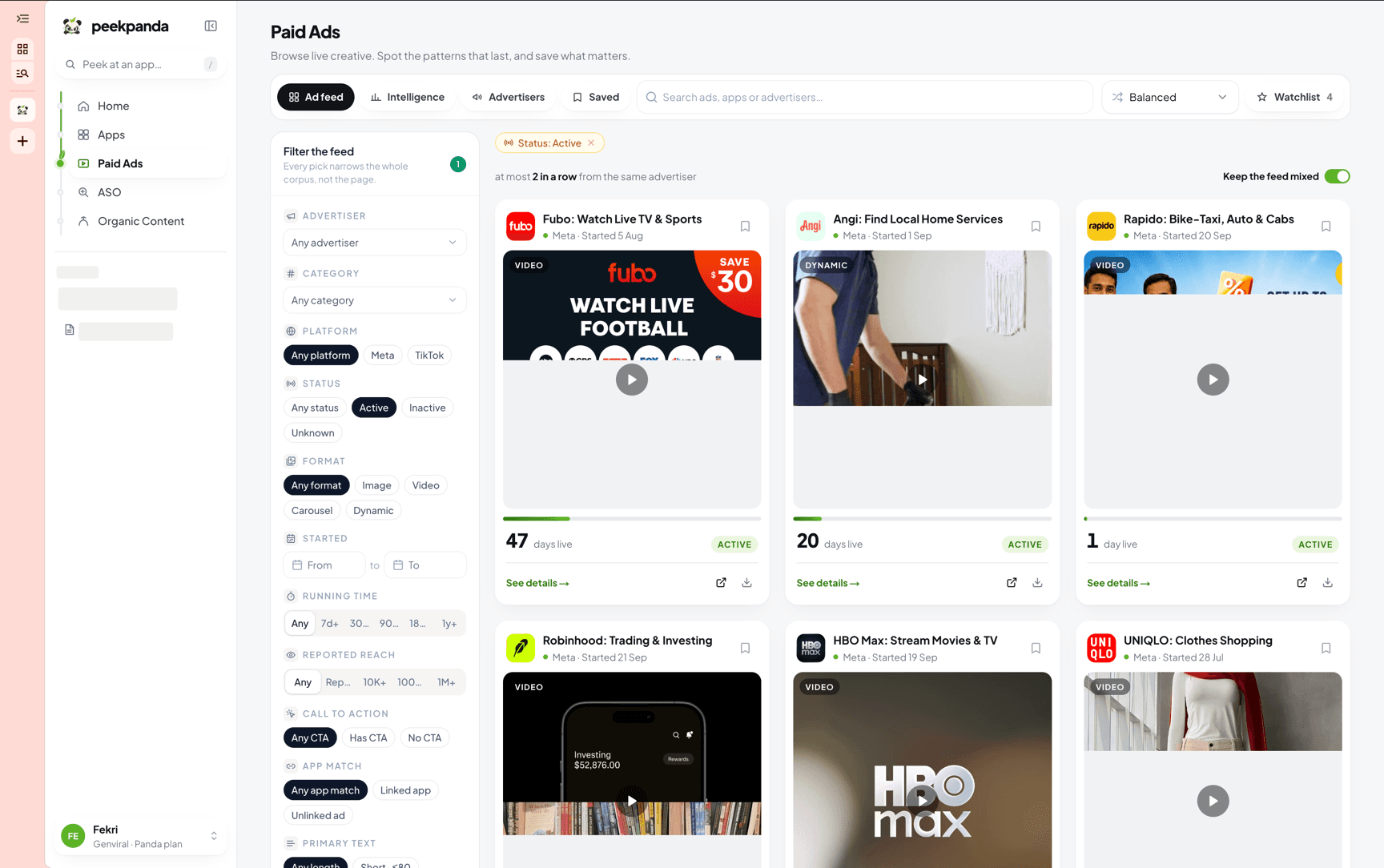 Paid-ad cards: identity, media, how long the ad has been observed, and the footer.
The card has four parts, top to bottom: the identity, the media, the facts, and the footer.
The identity row
The icon, the name, one line of context, and the bookmark button.
The name is whatever most specifically identifies the creative.
| Library | Name shown |
|---|---|
| Paid | The linked product's name, or the advertiser's name when the ad resolves to no product |
| Organic | The product name, or the creator's channel name, or the account handle |
Where no icon was collected, the card draws a coloured tile with the first letter instead. The colour is derived from the name, so the same product always gets the same tile.
The subline is the one line of context under the name.
| Library | Subline | Reading |
|---|---|---|
| Paid | Active · source platform | Observed active, with any disclosed timing context |
| Paid | Ended · source platform | No longer observed active, where an end date is disclosed |
| Paid | Source platform | No timing information was disclosed |
| Organic | @account · source platform | The account that posted it and the source context |
A green dot before the subline means the ad's observed status is active. Organic posts never carry it.
The bookmark button on the right saves the creative. Saving creatives covers where saved items go.
The media
The creative itself, with up to three markers on it.
- The format chip, top left:
Video,Slideshow,Carousel,Image,DynamicorUnknown. - A position chip such as
2/6when the creative has more than one image. Arrows step through them, and the dot strip underneath prints at most five dots before counting the rest as+n.
A video card shows a play glyph over its poster frame. Hovering or focusing the card plays the clip muted and looping. The video file is only fetched at that moment, and a browser set to reduce motion never starts it.
The signal on a paid ad
A paid card prints how long the ad has been paid for and whether it is still running.
- The stripe under the creative fills with run length and is full at 180 days. Green means the ad is live; grey means it was pulled. Scan a page and the longest-running ads stand out.
- The day count is the big number:
122 days live, or20 days, then pulledfor an ad that ended. - The status pill at the right reads Active, Inactive or Unknown.
- A reach tag such as
EU · 265.5Kappears beside the count only when Meta reported it. When nothing was reported, nothing is shown; the card never invents a number.
The line under the advertiser name gives the platform and the Started date the platform disclosed. When there is none it reads Seen, the date the ad was first collected, and the day count reads — with run length unknown.
The facts row on an organic post
Up to four short facts: Views, Likes, Comments, Posted. A fact that was never collected is dropped. A post with no comment count shows three facts rather than a fourth reading zero.
The footer
- See details → opens the full record: the inspector for a paid ad, the preview and details panel for an organic post.
- The link button opens the destination in a new tab. For a paid ad that is the product it points at, or its ad library entry when there is no product link. For an organic post it is the original post.
- The download button saves the creative's media file: the video when there is one, otherwise the first image. The file is named after the creative. When the browser will not read the file directly, it opens in a new tab instead of failing quietly.
Related
AI agent or LLM? Read this page as markdown