 peekpanda
API keys
Create a named API key, copy its secret once, and revoke keys you no longer trust.
Download Markdown ↓Manage API keys at the bottom of /account. Give a key a name, select Create key, and copy the secret immediately. The full secret is displayed once only.
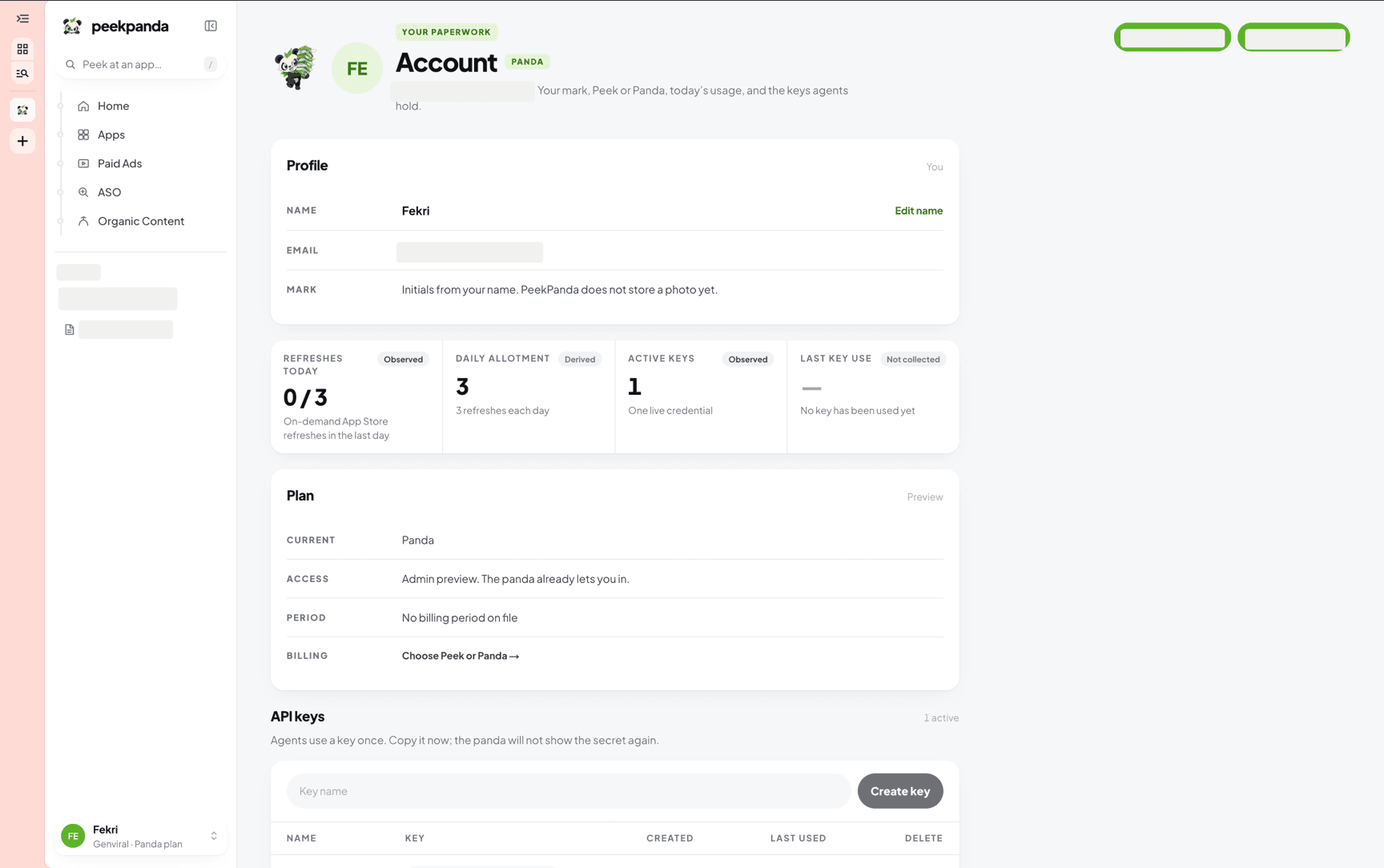 API keys at the bottom of Account. A secret is shown only at the moment you create it.
Creating a key
- Open
/accountand scroll to API keys. - Enter a descriptive name.
- Select Create key and copy the secret from the confirmation panel.
Store the secret in a secure credential manager. If it is lost or exposed, revoke the key and create a replacement; PeekPanda cannot show the full secret again.
Creating a key requires an active plan. Without one, the account page explains how to choose a plan.
Your keys
The key list shows its name, a safe identifier preview, creation date, latest use, and current status. Unused and revoked keys are clearly identified.
Revoking a key
Select Delete, then confirm the choice. The key stops working immediately. Its record remains visible as revoked so you can understand your account’s credential history.
Using a key
Keys authenticate requests made to PeekPanda’s public API. Treat a key like a password: do not place it in client-side code, share it in messages, or commit it to source control. See authentication and API reference before integrating.
Related
AI agent or LLM? Read this page as markdown