 peekpanda
Paid ads library
Search dated public paid-ad observations, inspect creative evidence, and understand what the library does not measure.
Download Markdown ↓Paid Ads opens /library?source=paid. It is a searchable library of public paid-ad observations, including creative media, copy, and the app or site each ad points to.
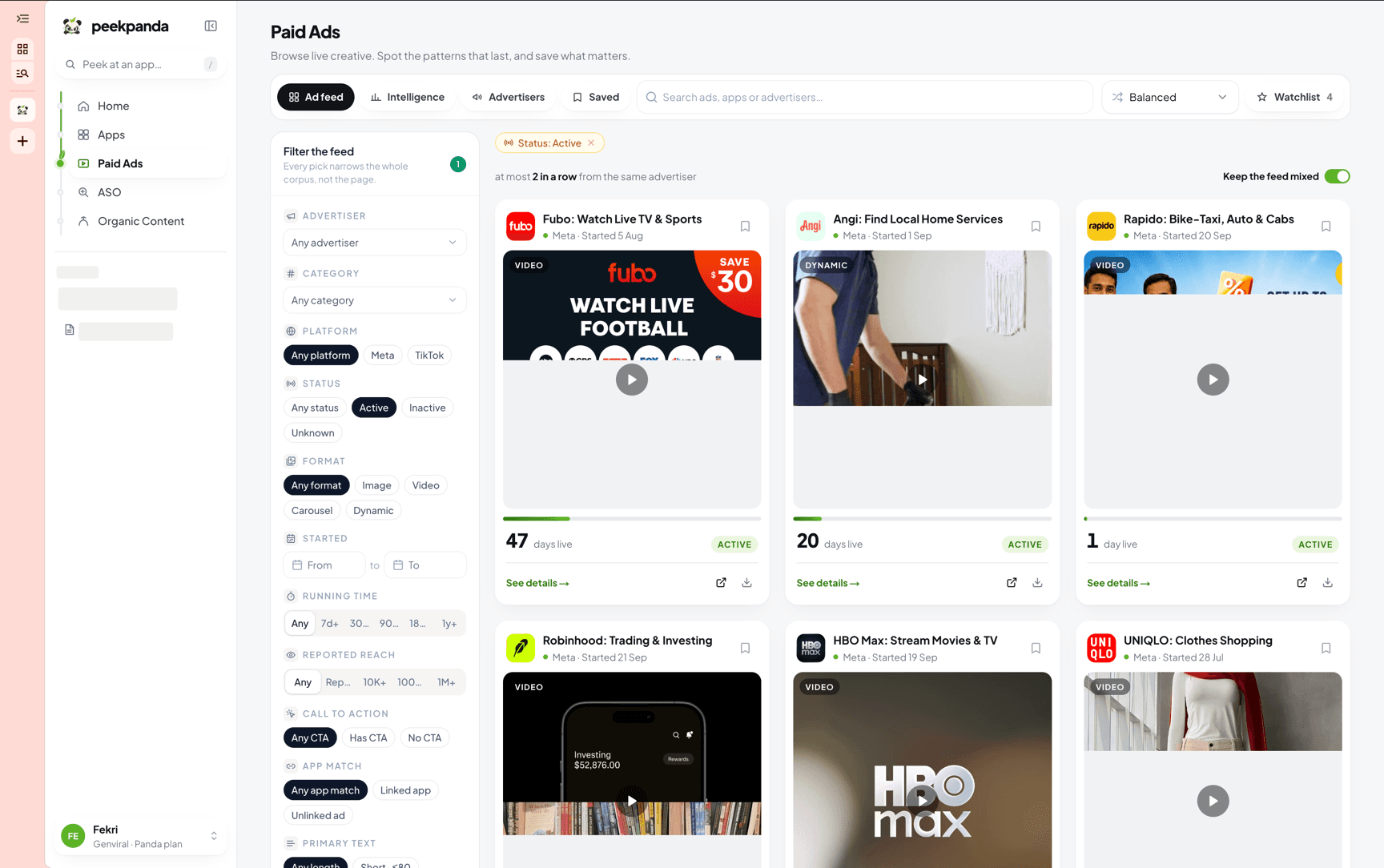 The paid ads library, with filters and active video cards.
The library shows stored evidence. Browsing it does not claim to perform a live check of an advertiser’s current campaigns.
Searching and filters
Search matches the available advertiser, creative, and destination information. A search for a known category term such as food or self improvement also includes ads linked to the matching canonical category, while unrelated searches stay literal. Filters narrow by source platform, canonical App Store category, observed status, creative format, start date, observed run length, CTA presence, primary-text length, reported reach, and verified app match. You can sort by when an ad was found, when it started where that date was disclosed, how long it has run, or by reported reach where available. Run length counts a live ad up to today and a stopped ad up to its disclosed end.
Through the API and MCP, GET /v1/paid-ads (MCP get_ads with action search) also takes storeIds for ads verified to link to up to 25 App Store apps, advertiserExternalId for one advertiser's exact page id, and discoveredAfter to read only ads recorded after an instant. A recurring check passes sort=recently_discovered and the newest discoveredAt it has already read. The dynamic format is Meta dynamic creative, which is often a static image.
The category picker uses this fixed English vocabulary: Health & Wellness, Personal Development, Relationships & Lifestyle, Arts, Hobbies & Entertainment, Education & Knowledge, Fashion & Beauty, Spirituality & Beliefs, Business & Finance, Travel, Food & Cooking, Home & Design, Fitness, Technology, Gaming & Esports, and Productivity & Organization. PeekPanda keeps the source category unchanged and maps only known separator, case, diacritic, and documented multilingual aliases into these labels.
An empty state means no stored observation matches the current search and filters. It does not prove that no matching ad exists.
Matching an ad to an app
PeekPanda links an ad to an app when the ad’s observed destination resolves to the same App Store identity. When the evidence does not support that link, the card uses the available destination or advertiser context instead.
No matching ad is not a claim that an app has never advertised.
Reading ad dates and status
An ad card may show a disclosed start date, an end date, an observed active status, or the date PeekPanda first recorded it. These are source observations, not a live delivery guarantee.
Time running describes the period disclosed by the public record. It does not reveal budget, spend, impressions, or profitability.
Reported reach
Some public records disclose reach for particular regions. Where available, PeekPanda shows it as a source-reported figure. It is not an impression count, spend figure, or PeekPanda estimate. If it is unavailable, the card says so rather than showing zero.
Opening an ad
Open a card to inspect available copy, creative media, source context, and destination link. You can save an ad to one or more boards, and open the original public record when available.
Transcript and AI-analysis views may be available for eligible creative evidence. If a result cannot be generated or is still in progress, PeekPanda keeps the prior evidence unchanged and explains the state.
Related
AI agent or LLM? Read this page as markdown