 peekpanda
ASO workstation
The ASO board holds the iOS apps you track and opens one case file per app, showing every collected search it appears in.
Download Markdown ↓The ASO workstation lives at /aso. It holds the iOS apps you track, yours and your rivals', and opens a case file for each one showing the App Store searches it appears in, how crowded each search is, and who sits ahead. Every App Store app you track here is on at least one of your boards: an app you add from ASO lands on your My apps board, and you can add it to any other board. Put an app on a board and PeekPanda tracks everything about it. You can also track a pre-launch app before it has an App Store listing.
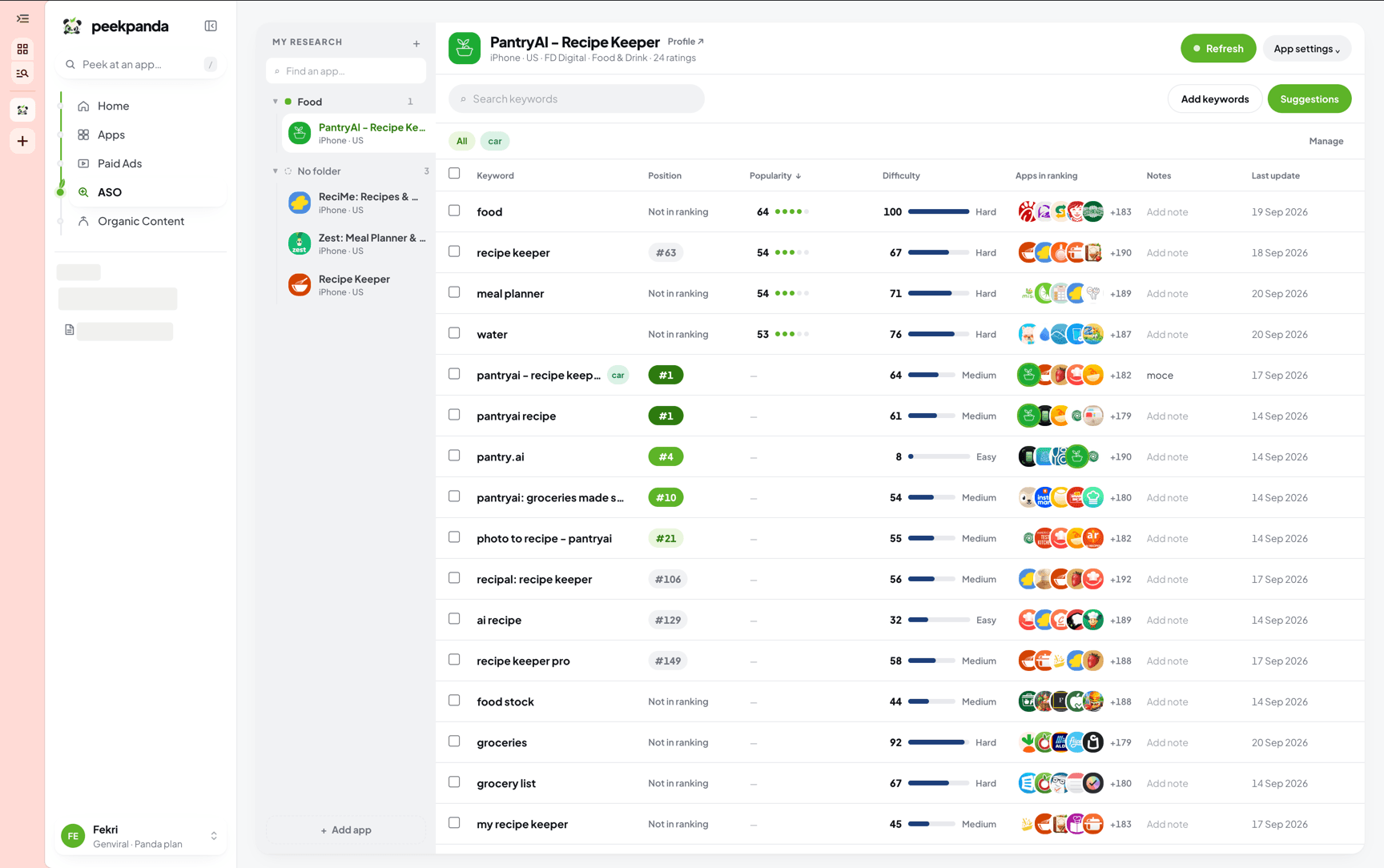 The ASO workstation for one tracked app, with collected searches, positions, and difficulty.
Everything here is US App Store only. Positions are the positions observed in the store's public search results, not native App Store ranks.
API and MCP clients can use get_aso_case_evidence for a compact stored summary of up to six tracked apps: rivals, keyword position history, and difficulty. This read never starts collection.
What the board shows
With nothing tracked, the board is a single field: type an app's name and pick it. With apps tracked, it shows:
- A Track another app card at the top.
- Your apps: everything you marked as Mine.
- Competitors: everything you added as Competitor.
- How many apps your plan tracks, for example
1 of 1 app trackedon Peek or3 of 100 apps trackedon Panda. Peek tracks 1 app and Panda tracks 100. Each app counts once, however many boards it is on, and each pre-launch app counts as one.
Each card carries the app icon, its name, the developer, when it was last refreshed, and a keyword count. That count is the number of collected searches the app currently appears in. It is not the number of keywords you typed in.
A card that has never finished a refresh reads Collecting… instead of a refresh time.
Inside one app
Open a card and you get the case file for that app.
Header. Next to the title sit the refresh pill, Mark as mine or Mark as competitor, and Stop tracking. If the app also has a catalogue profile, a Case file link appears beside the name.
Search presence. Four counts over the keywords collected so far:
| Tile | What it counts |
|---|---|
| Keywords tracked | Every collected keyword row, with how many of them you track on every refresh |
| Page one | Keywords where the app sits at position 1 to 10 |
| Best position | The best collected position, and the keyword it belongs to |
| Moved since last run | Keywords whose position changed between the last two collection runs |
A tile with nothing behind it reads Not collected and shows an em dash, never a zero. Moved since last run stays empty until some keyword has two runs.
Keyword workspace. A list on the left, ordered by Newest, Opportunity or Position. Each row shows the derived opportunity score, the keyword, #position · N apps, and a small line of its position history. Click a row to open that keyword's research in a popup without leaving the page.
Keyword table. One row per keyword shows its position with how far it moved since the run before, its opportunity, popularity and difficulty, the apps in its ranking, and its last update. Add private notes and tags to keep decisions with the keyword. Click a column heading to sort it.
Suggestions. Phrases the app does not rank for yet, drawn from the vocabulary of the titles ranking around it and from the store's own suggestions. Open Suggestions to review them, then add selected terms to collection.
Who it meets in search. The apps that keep turning up on the same searches, with a one-click keyword gap against any of them.
What you need to open it
The workstation needs an active PeekPanda entitlement. Without one the page shows a resting panda and the reason. Without a signed-in session it asks you to sign in with your Genviral account.
Limits
- Tracked apps: 1 on Peek, 100 on Panda, counted across your own space and every workspace you own.
- 100 tracked keywords per app.
- Stopping tracking takes the app off every board in the space and removes its tracked keywords too.
Related
AI agent or LLM? Read this page as markdown